RandomBytes – General tracker with good pre times

RandomBytes (Rby) is a private torrent tracker which tracks a lot of releases from the warez scene. Unlike specialized trackers it does not focus on a specific category of torrents. RandomBytes has average download speeds and good pre times. It has also acquired a reasonable user base and  looks like a good tracker to start with for new entrants to the BitTorrent scene (that’s not saying it’s a no-no for hard core users).

randombytes

As I mentioned earlier, one of the positives about RBy is its pre times. Although elites such as SCC and ScT beat RBy hands down, it has better pre times than most general trackers out there. RBy has won 350+ ‘pre time races’ on #Tracers channel (await a separate article on this) and is placed at the 8th position out of 30+ trackers. As of 23/2/2009, RBy tracks 3200+ torrents and has a user base of 3700+ members. 

The content on RBy are mostly scene releases. There are not many packs to speak of here.

RBY screen

RandomBytes has a seed bonus system – when you seed torrents for extended time periods, bonus points are added. These can later be used to purchase upload credit to give your global ratio a boost.

RBy registrations are currently open. All new members start up with 2.5GB free upload credit. If you are interested, check it out.

Site Name: RandomBytes (http://www.randombytes.org)

Signup URL: http://www.randombytes.org/signup.php

SMS Updates: No. RBy RSS feed is incompatible with TwitterFeed. (What are SMS Updates?)

Windows Live Writer, Mail, Photo Gallery - Standalone, Offline installer (14.0.8064.0296)

FILEnetworks Blog has been regularly posting offline/standalone installers for several leading software which are usually distributed using web based installers (aka web setups). Some users including those with limited or unstable internet connectivity, those with multiple computers, those who prefer redistributable installers, etc usually find web setups a pain in the ass. So here is the offline, standalone, redistributable installer for Windows Live Essentials v14.0.8064.0296 (Build 8064).

windows live

Included Live Apps

  • Windows Live Messenger 14.0.8064.0296 
  • Windows Live Mail 14.0.8064.0296
  • Windows Live Photo Gallery 14.0.8064.0296
  • Windows Live Writer 14.0.8064.0296
  • Windows Live Toolbar
  • Windows Live Family Safety
  • Windows Live Movie Maker

Download

All download links are from official Microsoft servers and support download managers. No 3rd party links have been included. Download size is 134MB.

[Click Here] to download Windows Live Essentials 14.0.8064.0296 (Build 8064) – Direct Download

Looking for the web setup? Try the Live download page.

Related Articles

Pretome Registration Key – March 2009

It’s been only one day since our last Pretome (PTM) Registration key expired and we have already got several E-mails requesting a new key. So here goes – another FILEnetworks exclusive Pretome registration key valid for another month. Since this is provided to us by PTM admins themselves, there is no need to worry about signing up with a blacklisted or traded key. Additionally, this registration key has no user limit.

pretome

More information about the Pretome tracker and screenshots can be found in our previous article located here. Something we’ve so far failed to mention about PTM is that it’s technically a ratio free tracker. That is, there is no global download:upload ratio on the site. You however do need to seed each downloaded torrent for 60 hours or to a ratio of 0.75 (only one of these requirements has to be met, not both).

Site Name: Pretome (http://pretome.net/)
Stats as of 22/02/09: 15700+ torrents and 24400+ users
Registration Key: 1f01845ac1777a432ff4197eeafd0812
Signup URL with Key: http://www.pretome.net/signup.php?key=1f01845ac1777a432ff4197eeafd0812
Validity Period : 21 February 2009 – 21 March 2009
IRC Channel: irc://irc.pretome.net:6667/pretome

Special thanks to Floxxx (PTM Owner) for providing FILEnetworks Blog with yet another exclusive PTM key.

Keep reading our private trackers section and the giveaways section for latest private tracker news and free invite giveaways!

FEAR 2 : Project Origin working trainer by BReWErS (10 options) - Download

Some good news for those who had problems with the previous F.E.A.R. 2 : Project Origin trainers. Scene group BReWErS just released a PLUS 10 trainer (10 options – save anywhere, unlimited ammo, unlimited health, unlimited armor, etc). I tested this with my FEAR2 installation (DIE release) and it seemed to work just fine. When it comes to game trainers, BReWErS is one of the best groups so there is nothing strange there.

FEAR 2 Trainer BREWERS

How to run the Trainer and What it does

Launch the trainer (bws-f2po.exe) before you launch the game. Keep it running in the background and press one of the following keys while in game to activate the corresponding effect:

Hotkey Option
F1 Infinite ammo and grenades
F2 Grenade master
F3 Infinite health
F4 Unlimited stamina
F5 Super speed
F6 Super jump
F8 Infinite armor
F9 Instant slowmo power
F10 One hit kill
NUMPAD 1 Save position
NUMPAD 2 Restore position

Trouble getting the Trainer to run in Windows Vista?

If you are running Windows Vista, please make sure to run the
trainer in administrator mode. Right click the trainer - Properties
- Compatibility and choose to run it as administrator.

Download

Links Removed

Some AntiVirus scanners may identify the trainer as a virus - this is most likely a false positive. If you downloaded the trainer from the link provided by us (above), we guarantee that it’s virus free.

CoExist tracker re-launches on TBDEV

You probably already know about CoExist.in (CE), a ratio free private music torrent tracker which was initially based on the Gazelle codebase. It looks as if CE has downgraded from the Gazelle to TBDEV script - the migration seems to have reset the torrent index as well as the user database. Although the site is open for signup and anyone is able to create an account, the new incarnation of CE is not complete yet. It’s just been launched and lots of things are still being worked on by its coders.

coexist logo

This is what ragincajun (CE Admin) wrote on TPS forums:

Ok guys, the site is not "open" for signups right now. We just got tbdev up on the server yesterday, so all it is right now is a skeleton of a tracker. If you feel that you must sign up right now go ahead, but I wouldn't advise it.

Now this should clear any doubts you had about whether or not CE was going to have open signups.  There is an additional note placed on the site’s homepage:

2009-02-21 - Do not be discouraged!! This is not what CE will look like in the very near future. Welcome back members and viva la coexist!! /s ragincajun77

As the notes say, CE has just migrated to the TBDEV script – the move is far from complete and there will be lots of features added in the coming days. Keep reading FILEnetworks Blog for more updates on this tracker. Full tracker review will be posted once the site is fully operational.

Site Name: CoExist (http://coexist.in)

Signup URL: http://coexist.in/signup.php (Confirmation mail may go to spam folder in Gmail)

ScenePirates, FreeTheScene, GBVNET & S.I.T.R. open for signup - 21/2/2009

Here is a short open signup update after a while. Three private torrent trackers, ScenePirates, FreeTheScene (FTS), GBVNET and SITR (SmokingInTheRain) are all open for signup at time of writing. All of these are general trackers which track movies, music, games, E-books, zero day software releases and more. Out of these sites, FreeTheScene (FTS) runs on the Gazelle codebase.

All of the trackers mentioned here have previously been reviewed in detail here on FILEnetworks Blog, – a link to full review can be found in the description filed of each tracker. Stats on the the number of torrents and the number of users on each tracker are updated on this article.

GBVNET
gbvnet 
Site Name: GBvNET Torrents (http://share.gbvnet.ro)
Signup URL: http://share.gbvnet.ro/signup.php
Stats: 4700+ torrents and 7000+ users
Description: GBVNET is a Romanian private tracker with lots and lots of English releases. It’s an underrated tracker which has close to 1000 unique torrents including packs. Full tracker review with screenshots and category details can be found here.

Free The Scene (FTS)
free the scene 
Site Name: Free.The.Scene (http://www.freethescene.net)
Signup URL: http://www.freethescene.net/register.php
Stats: ~2000 torrents and 4300+ torrents
Description: FTS is a general tracker that recently migrated to Gazelle codebase. Full review including screenshots can be found here.

Smoking In The Rain (S.I.T.R.)
smokingintherain
 
Site Name: SmokingInTheRain (http://www.smokingintherain.us)
Signup URL: http://www.smokingintherain.us/signup.php
Stats: 5500+ members and 3300+ torrents
Description: SITR is one of the older private trackers which has a good community. Full review with screens can be found here.

ScenePirates
scenepirates 
Site Name: ScenePirates (http://www.scenepirates.com)
Signup URL: http://www.scenepirates.com/account-signup.php
Stats: Unknown number of users and ~2000 torrents
Description: ScenePirates is a general tracker with a decent collection of scene and non scene torrents. More details can be found in this article.

How to get free SMS updates on new torrent releases (Movies, Games, TV & More)

RSS and E-Mail updates on new torrent releases are now being provided by most private and public BitTorrent trackers out there. But have you ever heard about SMS updates on new torrent releases? Wouldn’t it be cool if you could get notified via SMS when RELOADED releases the latest PC game, or when group mVs leaks a DVD Screener of a highly anticipated movie? Well, it’s possible and we are going to tell you how.

This is made possible by combining several free services such as Twitter, TwitterFeed and Twe2. All you need to get SMS updates is a Twitter account, a TwitterFeed account, and a phone connected to a mobile network compatible with Twe2 service. 
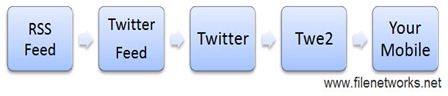
SMS Torrrent Updates FILEnetworks
This is how it works

We’ve provided step by step instructions below to setup SMS updates on new torrent releases. Although it may seem a lengthy process, it’s actually very simple. Check it out.

Creating a new Twitter account

First, you need to create a new Twitter account. Twitter account will be used to relay the torrent release updates via SMS. When signing up for a new account, It is important that you choose a unique text string as the username. This text should not already be present anywhere in the Twitter database. SMS updates will be based on a search for your Twitter username – if you choose a common name, you will get SMS updates unrelated to torrent releases. To determine if your username is really unique, do a search for it on http://search.twitter.com/. If the search returns no results, go ahead with the chosen name. If the search returns 1 or more results that means the string is common – choose another.

no results 

1. Go to http://twitter.com/signup and create a new account. Remember the username and password of this account – you will need them later.

TwitterFeed Configuration

Now, you have to integrate the RSS feed from the private/public BitTorrent tracker into the Twitter account. This can easily be done using TwitterFeed.

2. Visit www.twitterfeed.com and create a new account. Login using the newly created TwitterFeed account and click on ‘go to my twitter feeds (or create a new one)’.

3. Click on create new feed. You will be asked to fill a form.

4. In ‘username’ and ‘password’ fields, type the same username and password used for the Twitter account you created at step 1. Paste a compatible RSS feed from private tracker into the ‘RSS feed’ field. Note: For more help on finding a compatible RSS feed, see the ‘How to find a suitable RSS feed’ section below. Set the ‘Update Frequency’ to ‘Every 30 minutes’.

5. Now this is important – make sure you un-tick the ‘Include item link’ checkbox (See screenshot below). If you use the RSS feed of a private tracker, leaving this checkbox ticked will expose your passkey to the public - this could get you banned from the tracker.

6. Tick the ‘Active’ checkbox to activate the feed and press the update button.

twitterfeed config

Twe2 Configuration

As we mentioned in a previous article, Twe2 is a free service that delivers Twitter messages via SMS even to countries not supported by Twitter (for more information about this service and a list of supported countries, look here).

7. Visit http://twe2.com and login to Twe2 using username and password of the Twitter account you created at step 1. 

8. If you have not confirmed your mobile number, you will be prompted to do so. Enter the confirmation SMS code you receive in your mobile to complete the process.

9. Now you need to setup Twe2 so that it’ll search for and send SMS updates about any new tweets from your Twitter account. This is very easy. Go to ‘Twe2 Alerts’ panel in your Twe2 account. In the text field next to ‘Add Search Term’ button, enter the username of your Twitter account you created at Step 1. Press the ‘Add Search Term’ button to add the entry.

twe2 configuration

10. That’s it.  You should start receiving SMS updates on your mobile soon. Just wait a few hours for the RSS feeds to be updated and Twe2 messages to be sent.

Additional information – Choosing an RSS feed

Most private and public BitTorrent trackers now provide RSS updates. On private trackers these can usually be found on the links.php page (ex-http://www.sitename.com/links.php). Some sites index these under rss.php page. On Gazelle based trackers and several other bittorrent sites, you can get the URL of RSS feed by simply logging onto the site and clicking on the orange RSS icon on the browser address bar.

Feeds compatible with TwitterFeed

Some of the private tracker RSS feeds are incompatible with TwitterFeed. If you try to use an incompatible feed, TwitterFeed will return the error message “We couldn't find valid date/time stamps or GUIDs on items. Please make sure your feed contains valid pubDate entries or GUIDs for each post.”. Unfortunately, there does not seem to be any workaround in such cases. Only option is to use the feed of another tracker. Here is a list of public and private site RSS feeds that we've found to be working with TwitterFeed.

Note that some trackers offer categorized RSS feeds. Subscribing to a categorized feed is usually better (some trackers allow you to combine updates from several categories into one RSS feed). Subscribing to the entire feed will send SMS updates for every torrent added to the tracker whether you like it or not. When you subscribe to categorized or custom feeds, make sure you choose the ‘no cookies’ version.

Known limitations of this method

  • Sometimes it may take around 1 hour since the release of a torrent for the SMS to arrive
  • A maximum of 10 SMS updates can be sent per hour

If you find any errors in the article, need more information or need help, feel free to drop a comment.